Forensic Frustrations in Google Workspace
What the docs don't tell you about Google Workspace incident response
This blog was inspired by real world incident response cases in Google Workspace environments. Before we go into details, this isn't meant to simply bash or critique Google. This blog describes issues you might run into when doing incident response in Google Workspace environments. We think it's better to know this beforehand, so you can plan accordingly before an incident occurs.
Google Workspace
The collaboration and productivity suite of Google is called Google Workspace (GWS). Some of the well-known tools are Gmail, Google Drive and Meet. It's a SaaS product equivalent to Microsoft 365 and from an incident perspective, we typically see the following threats:
- Business Email Compromise (BEC), a variety of attacks targeting businesses on Google Workspace, most of the time the motivation is financial gain
- Account Takeover, threats that aim to gain access to Google Workspace account for further mlaicious activity for example sending phishing emails or selling access via criminal/darkweb forums
- IP theft, this type of threat is aimed at stealing data (emails, files, configurations) that are stored in Google Workspace products such as Gmail and Drive
Forensics & IR
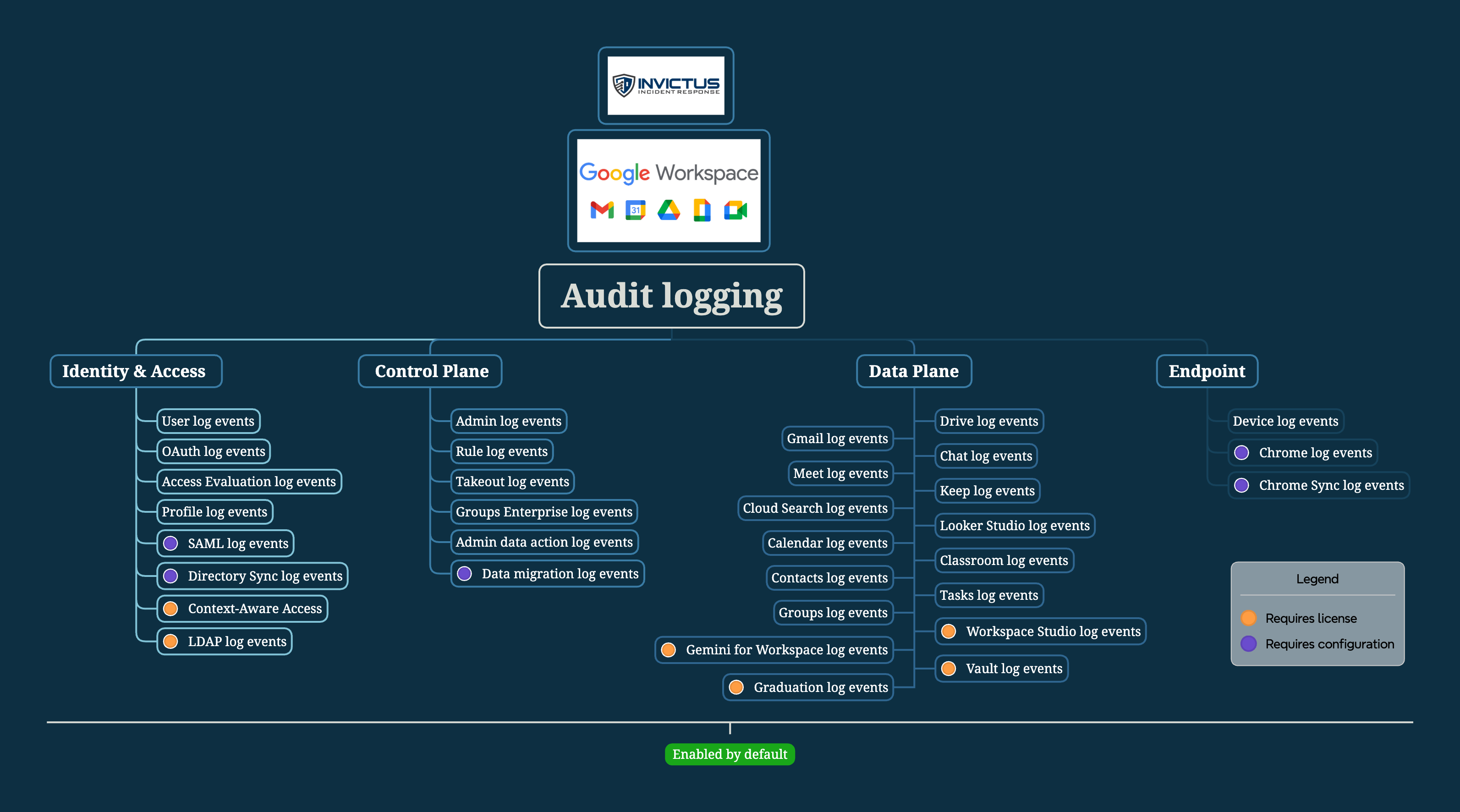
This blog is not long enough to give you all the details on GWS Forensics & IR, but since this is a SaaS product, most of your investigation revolves around log analysis. We have created a mindmap with the different logs and log categories available today in Google Workspace.
Three problems
The problems we've identified while doing IR and forensics in Google workspace can be categorized in thee buckets:
- Licensing
- Log Delay
- Correlation
Licensing
It's not the most interesting topic, but extremely important before an investigation. Google has several licensing tiers, this is from their pricing page.
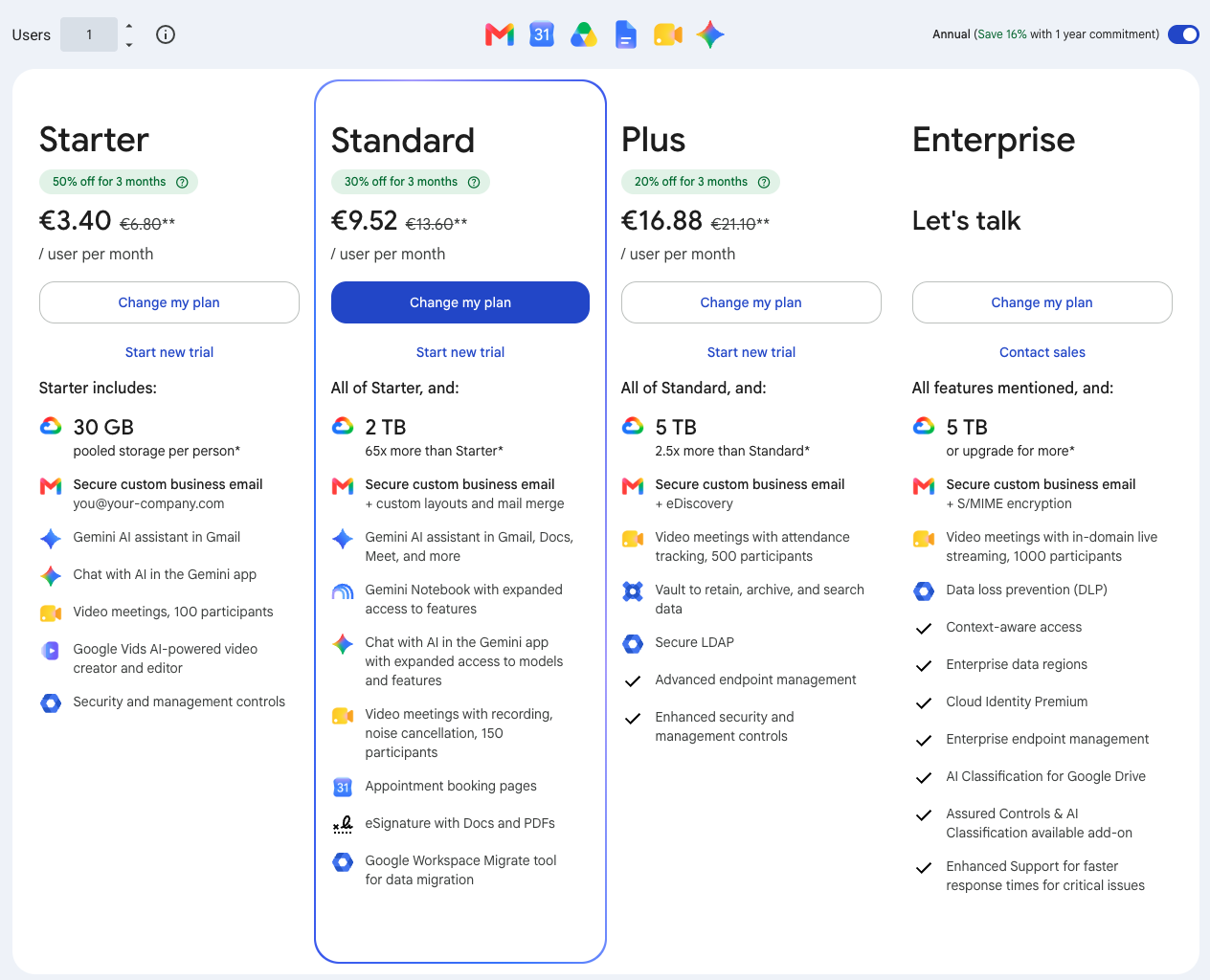
To complicate this even further Google has defined various verticals to which the above apply (Business/Education/Frontline/Enterprise). The licensing tiers don't explicitly mention logging, but they have a huge impact as we will find out soon. For now just now that Starter/Standard/Plus isn't sufficient for IR unless you are in the Education/Enterprise tier, which is already mind blowing if you think about it.
Log Delay
Moving on to log delay, this is actually quite good on first glance at Google. They publish the log delays on their website, which is great and a lot of the logs are near-realtime. This screenshot highlights a few of the logs where the delay is quite high:
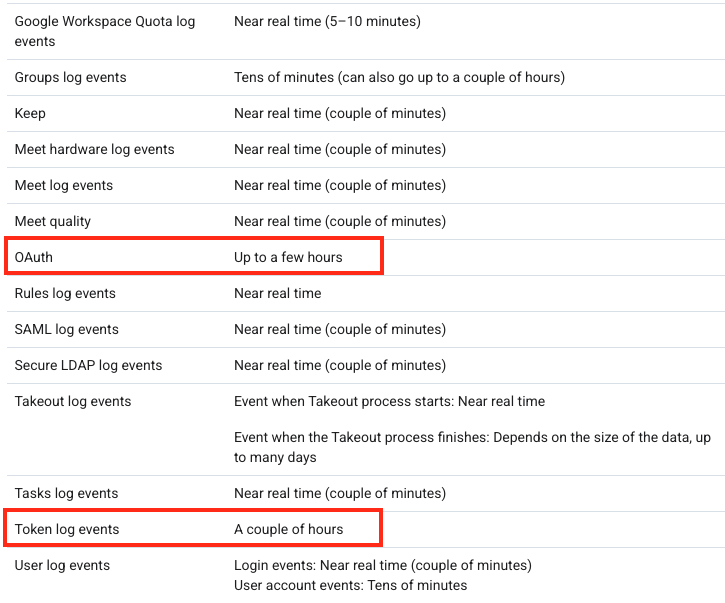
This is the crux of the research and what makes IR really challenging. Because, the OAuth/Token logs contain details about what an application did at which point in time. But what if it takes a couple of hours before that event is registered? The attacker might already have used their OAuth app to exfiltrate everything you care about....
Correlation
A third issue arises with correlation of log events. Google Workspace logs are quite isolated. You might have already seen that in the mindmap, particularly the Data Plane logs. They only log events about their service. This becomes a challenge especially when we look at the OAuth activity, this is the theme across the two cases we highlight in this blog. In both cases correlation between logs was required and this wasn't always possible.
Case study #1
Enough teasing let's talk about the real incident world. This incident occurred at an organization where an employee consented to an OAuth application with Google Drive scopes. Several things happened, but one of the things the threat actor did was use the OAuth app access to search with keywords for files in Google Drive. We were engaged to answer the most important question: "What data was accessed by the bad guys?"
We started with what was known and that was the name of the OAuth application, the OAuth log events are the logical next step. So what's in this log?
- Application(Client) name and ID
- Scopes(APIs) the application can access on behalf of the user
- Authorise/Revoke events, when was the application consentend and when was access revoked
- The user who consented the application
For our investigation this log is missing the following information:
- What files were accessed
- Data volume of files accessed
- Other services that were accessed via the app
Let's look at an example log entry..
Let's now apply the three problems to this case.
Licensing
Without a Plus or Enterprise license you will not see any API calls, you will only see Grant/Revoke/Deny events. No API calls will be recorded, an example of the difference shown below:
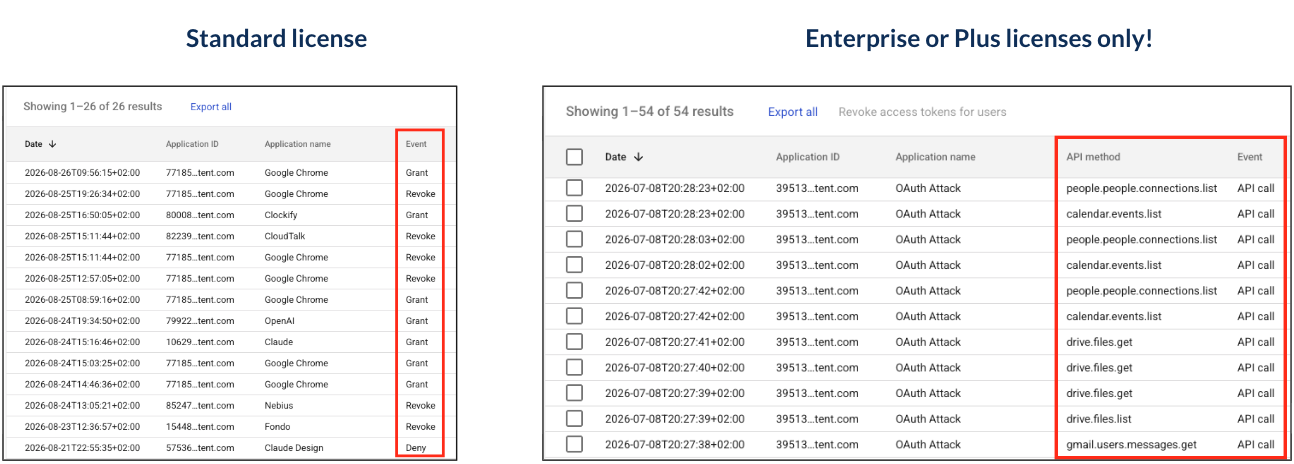
Meaning that without the right license, the OAuth log will not show you any API calls made by OAuth apps. Upgrading your license during an incident doesn't fix this.
Log Delay
The fact that the OAuth log has a delay of "a couple of hours" can become an issue when responding to active incidents. Because you will not know what the app is doing while you're responding to an incident. The trick here is to make sure you understand the API permissions of the app. Once you know that you can go to the specific logs for that API (e.g. the Google Drive log) and search for app activity. This is also a nice bridge to the third problem.
Tip: Use the consented scopes for the application to identify which Google Services could have been accessed by an OAuth app
Correlation
Luckily for us Google has Google Drive logs and they will allow you to correlate on Application so you can see all events performed by an application against Google Drive events. The screenshot below shows both the OAuth log (with the right license) and the associated Google Drive entry.
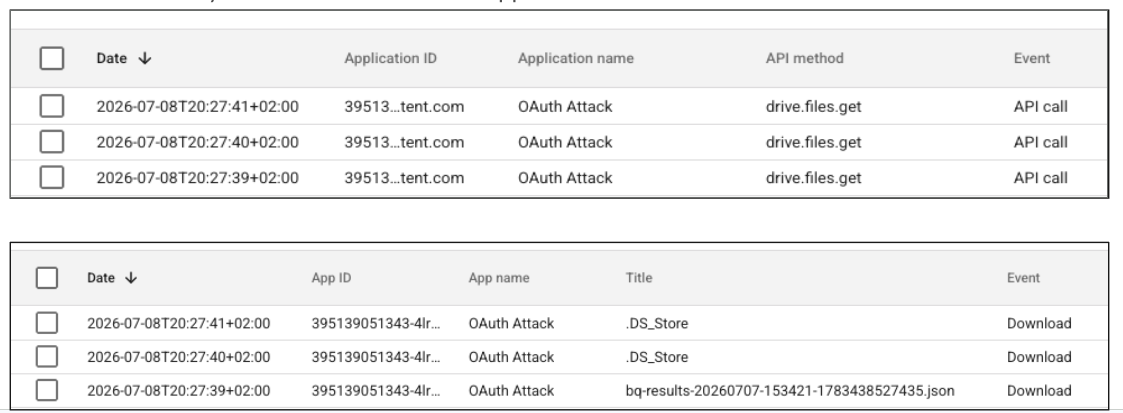
If you don't have the right license you will have to manually go through the different Control Plane logs to try to figure out what did the OAuth app touch.
So what did we learn from this incident?
- Only the more expensive licenses will give you insight into OAuth API calls
- The OAuth log on its own will only tell you an API call was made, you have to manually correlate with other logs to get the full picture
Ok this isn't great, but is that all.. No! There is more join us for the next incident.
Case study #2
In this incident an OAuth app was compromised via a supply chain compromise, as a result the threat actor could access the email belonging to a user that had consented to the application. So the beginning of our investigation is similar. We can use the OAuth log events to figure out the app and its permissions, however our focus was now to identify which emails were accessed and what was inside the emails. This determines the next steps of the investigation as well as the scope of the attack. Good news this customer was on an Enterprise license so full visibility!
Let's start with the OAuth logs and search for all activity performed by the application in question, the screenshot shows all calls made by the application. We've replayed this attack in a tenant we own with Enterprise licensing on.

In reality these numbers were much higher in the order of thousands. The highlighted event is the one we're interested in, this call is recorded when an OAuth app accesses/retrieves a Gmail message. So let's find the associated emails. This is what is inside the event:
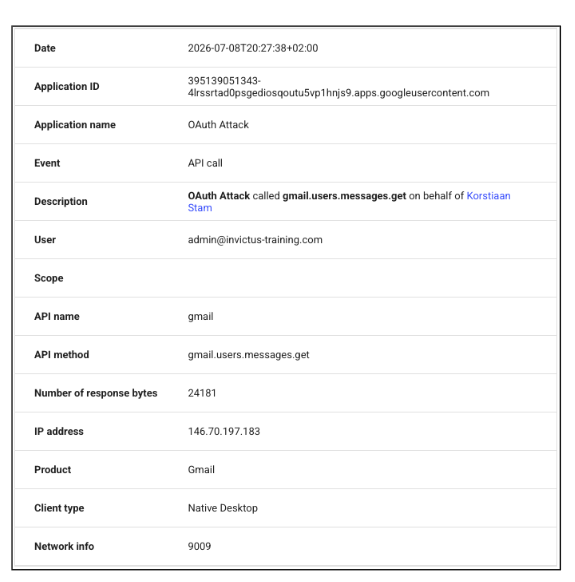
We can see the following information, that we can use for pivoting:
- App/Client ID
- IP-Addresss
- Time
- Response size
The first finding is there's no unique message id or other email identifier in this event. Where do we go to find out more about emails in Google Workspace logging, we go to the Gmail log events, they contain all kinds of information about emails, as shown below:
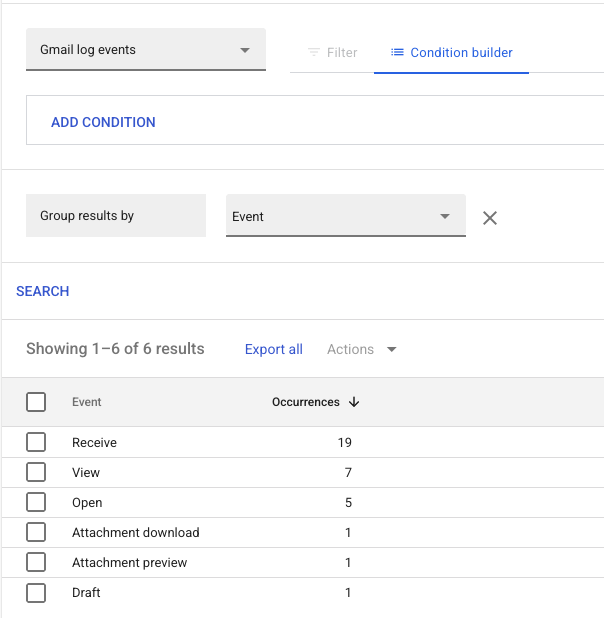
So let's pivot on the App/IP and other things we know about the app, surely that works right...
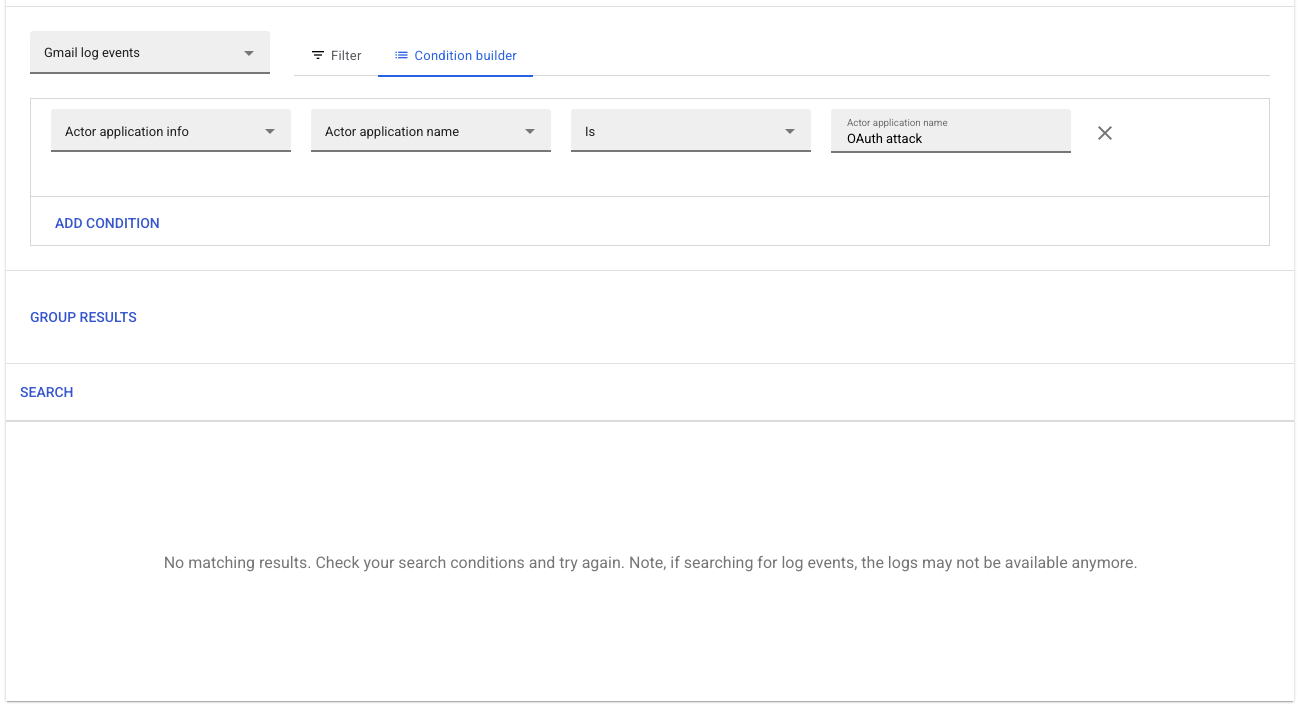
Maybe the IP-address then...
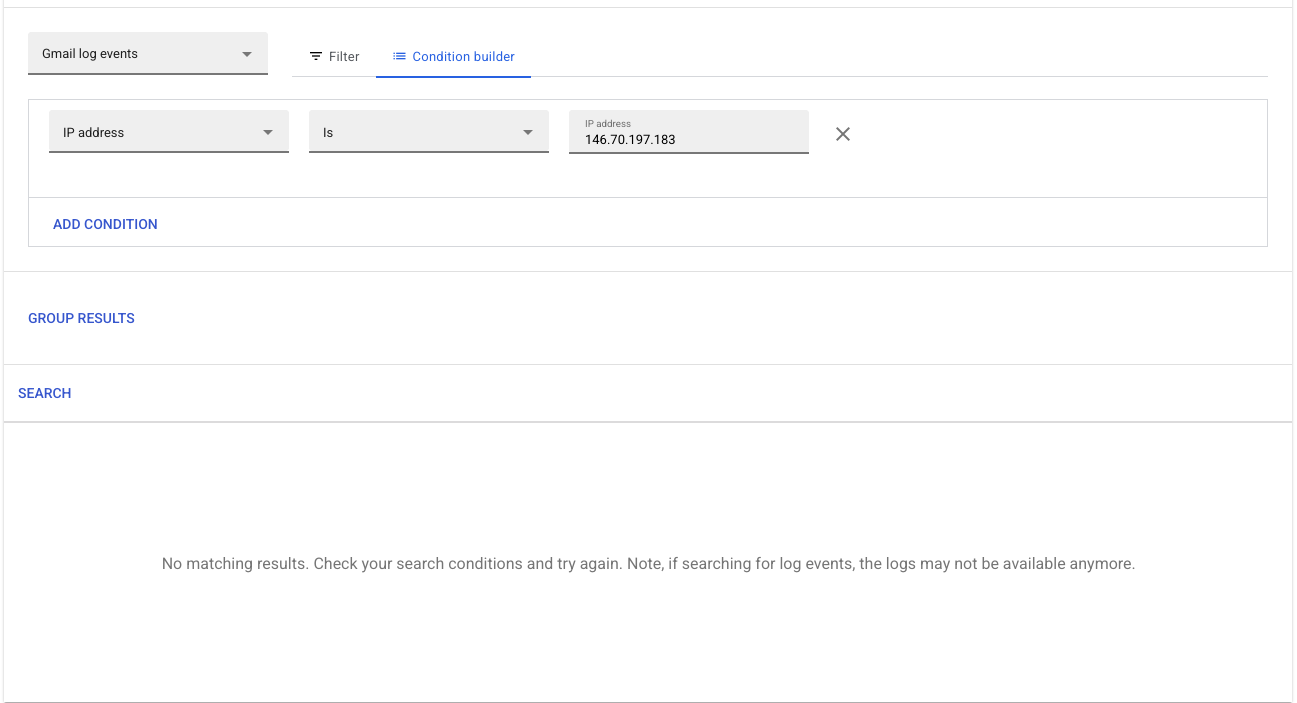
Last but not least, let's look at the time of the email access, maybe that's how we can find it..

At this point you should be worried, because at the time of writing this the following statements apply to investigating Gmail access by OAuth apps:
- The only thing we can say is that an application was used to retrieve emails.
- We cannot determine which exact emails were accessed by an application
- This is an issue across all licenses from the lowest one to Enterprise Plus
- This is not an issue for normal user access only for access via OAuth
What can you do?
You will have to assume full mailbox compromise, which isn't great. Especially if you think about how many emails typically are within an inbox this can be a lot of work to analyse them for PII or other sensitive data. What you can do is use Google Vault to determine what emails were in the users inbox. Alternatively, you can use the Gmail Messages table to review emails for a given user. Keep in mind that it only shows currently available Gmail Messages not deleted emails.
Takeaways
There aren't many solutions in this talk, but there are some things you can do right now to prevent investigation limitations in the future. The main problem of not being able to correlate OAuth activity towards specific email messages isn't something we can solve. Google will have to do that for us. The following things can be done:
- Be aware of your license and its limitations
- When doing IR, you can always add Google Vault in order to investigate what data was present in mailboxes
- Be aware of your ingestion lag baseline per log type
- Do not rely on forwarding logs to Google Cloud, it only forwards a subset of Google Workspace logs.
When faced with an incident in Google Workspace, make sure you get a full acquisition of all the logs. The GUI has limitations so use our open-source acquisition tool ALFA.
About Invictus Incident Response
We are an incident response company and we ❤️ the cloud and specialize in supporting organizations in preparing and responding to a cyber attack. We help our clients stay undefeated!
🆘 Incident Response support reach out to cert@invictus-ir.com or go to https://www.invictus-ir.com/24-7
Be ready for the next cloud incident.